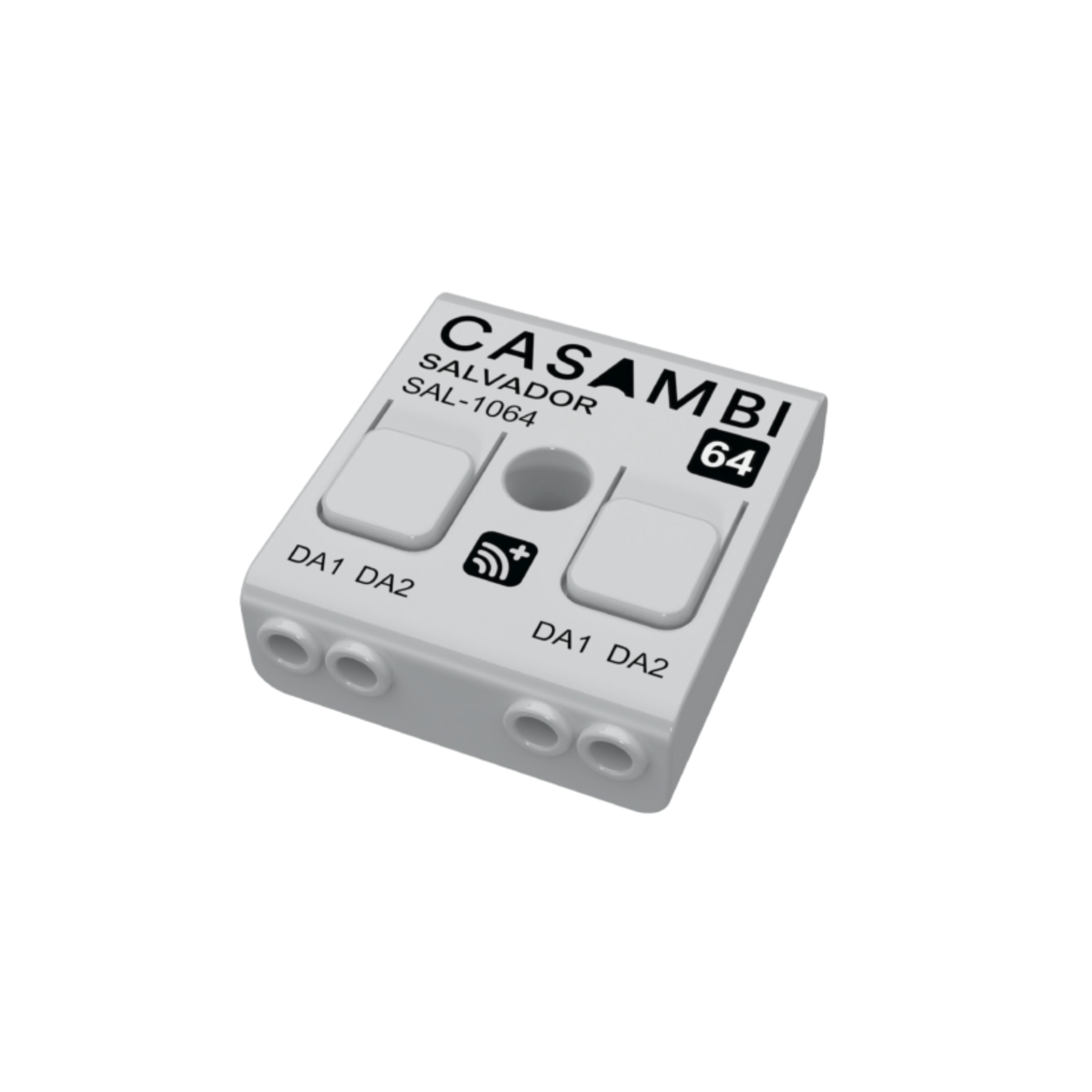
DALI Master that integrates wired DALI drivers into the Casambi wireless mesh network — 16, 32, or 64 DALI addresses, no separate DALI controller required.
If your project is running a wired DALI system and you want to bring it into a Casambi mesh network without replacing drivers or re-running cables, the Salvador Series 1000 solves exactly that problem. The Casambi Salvador SAL-10XX is a DALI Master that integrates directly into the Casambi BLE Mesh network, making each wired DALI driver appear as a standard Casambi luminaire in the app. All addressing, grouping, scene configuration, and automation are handled through the Casambi App — no dedicated DALI commissioning software or separate controller required.
Three variants are available by capacity: SAL-1016 (up to 16 DALI addresses), SAL-1032 (up to 32 DALI addresses), and SAL-1064 (up to 64 DALI addresses). The hardware across all three models is identical — the only difference is the number of DALI addresses each can manage. Two critical points before specifying: Salvador Series 1000 is compatible with Casambi Evolution networks only and will not operate on Casambi Classic. Additionally, only DALI drivers may be connected to Salvador — DALI sensors and DALI switches cannot be wired to it.
Parameter | Detail |
|---|---|
Input Voltage | 9.5–22.5 VDC (powered from DALI bus) |
Idle Current | 5 mA |
Peak Current | 30 mA |
Max DALI Bus Current | 250 mA (total across entire DALI line, all power supplies combined) |
Standby Power | < 0.2 W |
DALI Addresses, SAL-1016 | Up to 16 addresses |
DALI Addresses, SAL-1032 | Up to 32 addresses |
DALI Addresses, SAL-1064 | Up to 64 addresses |
DALI Protocol Support | DALI D4i, DT6, DT8 |
Parameter | Detail |
|---|---|
Radio Frequency | 2402–2480 MHz (Casambi BLE Mesh) |
Max Output Power | +8 dBm |
Indoor Wireless Range | Up to 50 m (depends on installation environment) |
Outdoor Wireless Range | Up to 200 m (line of sight, theoretical) |
Operating Temperature | -20°C to +55°C |
Max Case Temperature (tc) | +65°C (measured at bottom surface) |
Storage Temperature | -25°C to +75°C |
Max Relative Humidity | 0–80%, non-condensing |
Dimensions | 40.4 x 36.3 x 14.0 mm |
Weight | 15 g |
Protection Rating | IP20 (indoor use only) |
Wire Range | 0.5–1.5 mm², solid conductor, 16–20 AWG |
Wire Strip Length | 6–8 mm |
Casing to DALI Insulation | Reinforced |
Network Compatibility | Casambi Evolution only (not compatible with Casambi Classic) |
Certification | CE |
In a traditional DALI project, you need at least one dedicated DALI controller, specialist commissioning software, and someone with deep DALI knowledge to address each driver. Salvador replaces that entire layer with the Casambi App on iOS and Android.
Once Salvador is powered from the DALI bus and joined to a Casambi Evolution network, all connected DALI drivers automatically appear in the app as standard Casambi luminaires. From there, the lighting designer or commissioning engineer can:
Address DALI drivers directly in the Casambi App, no separate DALI commissioning tool needed
Create groups, scenes, and automation combining DALI drivers with other Casambi Ready devices in the same network
Adjust dimming per luminaire or across groups using programmed scenes
Monitor luminaire status (DT6) and colour temperature (DT8) if the driver supports it
One important note when designing the DALI power system: the total current across the entire DALI line must not exceed 250 mA, counting all DALI power supplies on that line combined. Exceeding this limit risks system faults or permanent damage to components.
A practical point from field installations: Salvador must not be placed inside a metal enclosure or mounted next to large metal structures, as this will block BLE Mesh signals. Always perform a wireless connectivity test on site before finalising the installation.
All three Salvador models share identical hardware and firmware. The only difference is the maximum number of DALI addresses each device can discover and manage.
Model | Max DALI Addresses | Typical Application |
|---|---|---|
SAL-1016 | 16 addresses | Small DALI retrofits, replacing standalone DALI networks, small offices |
SAL-1032 | 32 addresses | Mid-size office floors, commercial areas, medium hybrid networks |
SAL-1064 | 64 addresses | Large projects, hotels, commercial buildings, large hybrid networks |
Important: Salvador will only discover and address the number of drivers matching its model limit. If more drivers than the limit are physically connected to the DALI bus, the Casambi App will report an error during discovery and terminate the process. Salvador does not electrically prevent additional drivers from being wired in, but any drivers beyond the limit will not be managed.
If a project requires more than 64 addresses, the solution is to use multiple Salvadors within the same Casambi network. Each Salvador operates as an independent node, but all DALI drivers across every Salvador appear and can be controlled within a single Casambi network — no zone splitting or separate networks required.
This is the core value Salvador brings to projects that already have wired DALI infrastructure but want to integrate into the modern Casambi BLE Mesh ecosystem.
Once Salvador is commissioned, wired DALI drivers and Casambi Ready devices (native Casambi luminaires, CBU modules, switches, etc.) appear together in the same Casambi network. The lighting designer can:
Build scenes combining both wired DALI luminaires and Casambi Ready devices in a single scene
Schedule automation that applies simultaneously across the entire network, regardless of device type
Control remotely via the Casambi App or Casambi Cloud Gateway (if deployed)
Manage colour (DT8) and power level (DT6) of DALI drivers, where supported by the driver
Regarding network scale: a single Casambi Evolution network supports a maximum of 250 nodes. Each Salvador counts as 1 node. Each DALI driver addressed by a Salvador also counts as 1 node. When planning network capacity, account for the total of Salvador units + DALI drivers + other Casambi Ready devices against this 250-node limit.
One practical note from commissioning experience: DALI sensors and DALI switches cannot be connected directly to Salvador. If the design requires DALI control devices in the Casambi network, they must be converted to Casambi Ready using a suitable Casambi CBU or a device from a Casambi Ecosystem Partner.
Salvador Series 1000 operates within a Casambi Evolution network and is compatible with the Casambi App on iOS and Android. Three radio modes are available when creating a network in the Casambi App:
Radio Mode | Salvador Support | Notes |
|---|---|---|
Balanced | Yes | Standard range mode |
Better Performance | Yes | Prioritises performance, shorter range |
Long Range | Yes (conditional) | Only active when all devices in the network support Long Range |
Platform / System | Support | Notes |
|---|---|---|
Casambi Evolution Network | Yes | Native, required |
Casambi Classic Network | No | Not compatible |
Casambi App (iOS) | Yes | Latest version and the two preceding major versions |
Casambi App (Android) | Yes | Latest version and the two preceding major versions |
Casambi Cloud Gateway | Yes | Remote control when a Cloud Gateway is present in the network |
DALI D4i | Yes | Reads diagnostics data from D4i-compliant drivers |
DALI DT6 | Yes | Fluorescent/LED dimming control |
DALI DT8 | Yes | Colour control (tunable white, RGBWAF) |
1x Casambi Salvador Series 1000 (per ordered model: SAL-1016, SAL-1032, or SAL-1064)
External DALI bus power supply, if the DALI drivers in the system do not have an integrated bus power supply
Solid conductor cable 0.5–1.5 mm² (16–20 AWG), stripped 6–8 mm
A Casambi Evolution network (existing or newly created via the Casambi App)
Do not place Salvador inside a metal enclosure or mount it adjacent to large metal structures
The two DALI connector sets (DA1/DA2) are internally connected in parallel — DALI bus wiring can be routed through the device
DALI bus connections at DA1/DA2 are polarity-independent
Verify total DALI line current does not exceed 250 mA before energising
Perform an on-site wireless connectivity test before finalising the installation
Need help designing a Casambi system or evaluating how to integrate your existing DALI infrastructure into a Casambi Evolution network? Contact the KNXStore technical team:
| Variants | SAL-1016 / SAL-1032 / SAL-1064 |
| DALI Addresses (SAL-1016) | 16 địa chỉ |
| DALI Addresses (SAL-1032) | 32 địa chỉ |
| DALI Addresses (SAL-1064) | 64 địa chỉ |
| Input Voltage | 9.5–22.5 VDC |
| Idle Current | 5 mA |
| Peak Current | 30 mA |
| Max DALI Bus Current | 250 mA |
| Standby Power | < 0.2 W |
| Radio Frequency | 2402–2480 MHz |
| Max Output Power | +8 dBm |
| Indoor Range | 50 m |
| Outdoor Range | 200 m |
| Operating Temperature | -20°C to +55°C |
| Max Case Temperature | +65 °C |
| Storage Temperature | -25°C to +75°C |
| Max Relative Humidity | 0–80%, non-condensing |
| Dimensions | 40.4 x 36.3 x 14.0 mm |
| Weight | 15 g |
| Protection Rating | IP20 |
| Wire Range | 0.5–1.5 mm², 16–20 AWG |
| Wire Strip Length | 6–8 mm |
| DALI Protocol | DALI D4i, DT6, DT8 |
| Network Compatibility | Casambi Evolution |
| Certifications | CE |
No. The Salvador Series 1000 fully replaces a dedicated DALI controller. DALI driver addressing, programming, and control are handled entirely through the Casambi App.
The only difference is the maximum number of DALI addresses: SAL-1016 handles 16 drivers, SAL-1032 handles 32, and SAL-1064 handles 64. Hardware, dimensions, and all other features are identical.
No. Only DALI drivers can be physically connected to Salvador. DALI sensors and switches must not be wired directly. If they need to be part of the Casambi network, they must be converted using a suitable Casambi CBU or Ecosystem partner device.
It draws power directly from the DALI bus (9.5–22.5 VDC). An external DALI bus power supply is mandatory. If connected directly to a DALI driver, that driver must have an integrated DALI bus power supply.
No. Salvador Series 1000 is compatible with Casambi Evolution networks only and will not operate on Casambi Classic networks.
Yes. Each Salvador counts as one node, and each addressed DALI driver also counts as one node. A single Casambi network supports up to 250 nodes total.
KNXStore is an authorized Casambi distributor in Vietnam and provides warranty support per the manufacturer’s policy. Contact our hotline at 0378.628.837 for details on warranty and technical support.