

What is the Casambi Gateway?
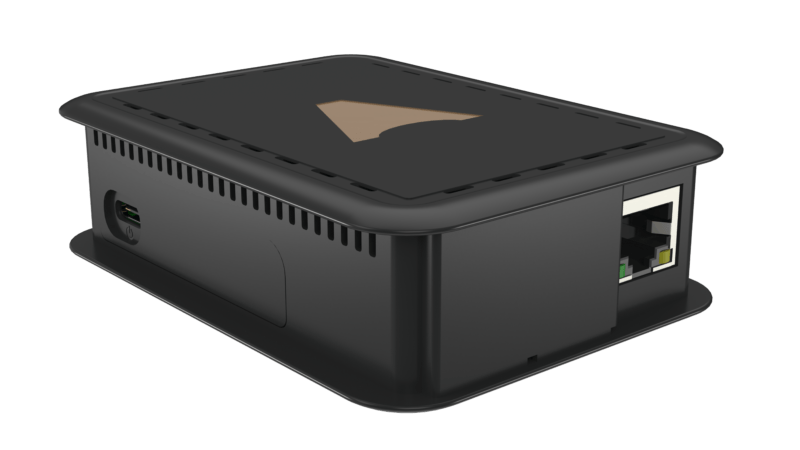
The Casambi Gateway is a dedicated hardware device that connects a Casambi BLE Mesh network to the building's Ethernet infrastructure. Once installed, the BMS can send control commands or read the status of individual Casambi lighting zones as if they were standard BACnet devices on the network.
Not every Casambi project requires a Gateway. For small to medium-sized buildings, the Casambi app on a smartphone is sufficient for day-to-day operation. A Gateway becomes necessary only when two specific requirements arise: integration with the building's existing BMS, or remote IP management of the Casambi network.
What protocols does the Casambi Gateway support?
The Casambi Gateway supports the two most widely used BMS protocols in commercial buildings in Vietnam:
BACnet/IP: the building automation data exchange standard under ASHRAE 135. The Casambi Gateway appears as a BACnet device on the network, with object read/write points mapped to each lighting zone. Compatible with Siemens Desigo CC, Honeywell EBI, Johnson Controls Metasys, and Schneider Electric EcoStruxure.
Modbus TCP: a simpler protocol widely used in SCADA and industrial monitoring systems. Engineers choose between BACnet and Modbus based on the BMS platform in use.
Beyond the two BMS protocols, the Gateway also supports connectivity to Casambi Cloud over the Internet, enabling remote access from anywhere and centralized management of multiple sites from a single interface.
Technical specifications of the Casambi Gateway
The Casambi Gateway is designed for installation inside an electrical cabinet. It uses a standard DIN rail form factor, is powered at 24VDC, and connects to the building's IP infrastructure via an Ethernet RJ45 port.
Initial configuration is performed through a web browser pointed directly at the Gateway's IP address on the LAN. The technician links the Gateway to an existing Casambi network, then maps each control zone to the corresponding BACnet objects. From the BMS side, the engineer reads and writes these objects exactly as they would with any other BACnet device.
One Gateway manages one Casambi network, which supports up to 250 nodes. Projects with multiple networks require a separate Gateway for each and use Casambi Cloud for centralized multi-network management.
Which projects is the Casambi Gateway best suited for?
The Casambi Gateway is best suited for the following project types:
High-rise offices and mixed-use buildings: where Siemens, Honeywell, or Johnson Controls BMS is already managing HVAC, blinds, and fire safety. The Gateway allows the BMS to bring Casambi into the same centralized operations interface.
4 and 5-star hotels: where the Building Management System needs to control lighting, temperature, and security from a single point. The Gateway bridges Casambi lighting into the existing BMS structure.
Museums and large shopping centers: where detailed energy consumption reporting is required by zone. The Gateway provides real-time status data for the BMS to track operating hours and calculate electricity costs.
Multi-site projects: hotel chains or real estate companies managing multiple buildings. Casambi Cloud combined with a Gateway at each site enables centralized management from a single interface.
Casambi Gateway versus Casambi API Gateway
Casambi provides two different IP integration paths suited to different system architectures:
Casambi Gateway (hardware): a DIN rail device communicating via BACnet/IP and Modbus TCP. The right choice for projects using traditional BMS platforms, with no custom programming required and reliable, stable connectivity.
Casambi API Gateway (software): a REST API over HTTP, intended for developers who want to integrate Casambi into custom building management software, retail applications, or IoT systems that do not use BACnet.
Most commercial projects in Vietnam use the hardware Gateway because Siemens, Honeywell, and Johnson Controls BMS platforms communicate natively over BACnet. The Casambi API Gateway typically appears only in projects with an in-house software development team.
Connecting the Casambi Gateway to Siemens, Honeywell, and Johnson Controls BMS
The integration process for the Casambi Gateway with common BMS platforms in Vietnam typically follows three steps:
Step 1 – Physical installation: mount the Gateway on a DIN rail in the electrical cabinet, connect 24VDC power, and run an Ethernet cable to the building's internal switch on the same VLAN as the BMS server.
Step 2 – Gateway configuration: log into the Gateway's web interface, link it to the existing Casambi network, then assign a BACnet device ID and map each Casambi group and scene to the corresponding BACnet objects.
Step 3 – BMS integration: the BMS engineer adds the new BACnet device to the BMS server configuration, confirms the read/write points are active, then integrates the lighting zones into the building's graphical interface.
KNXStore.vn has hands-on experience integrating the Casambi Gateway with multiple BMS platforms. Contact us for project-specific technical advice via hotline 0918.918.755 or email sales@knxstore.vn.