

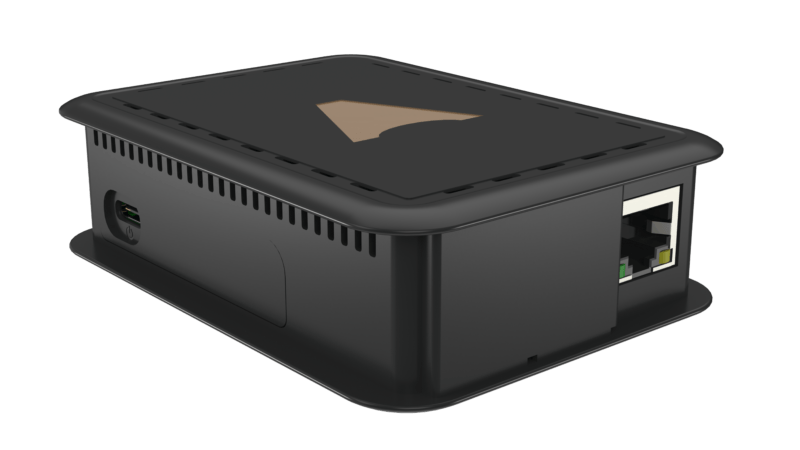
Hardware device connecting a Casambi BLE Mesh network to the Internet for remote monitoring and control via the Casambi app. Built on Raspberry Pi with Gigabit Ethernet and Wi-Fi 802.11ac. Available in two variants: CGW-001-PSU and CGW-001-POE.
The Casambi Cloud Gateway is a hardware device that lets you receive data from and remotely control a Casambi BLE Mesh lighting network over the Internet. Instead of needing to be on-site or within Bluetooth range, technicians and facility managers can monitor and control the entire lighting network from anywhere in the world using the Casambi app on iOS or Android. It is the natural choice for multi-site projects and any installation where real-time remote access outside business hours is a requirement.
The Casambi Cloud Gateway is built on Raspberry Pi 4 hardware, with Casambi Technologies integrating Evolution firmware directly to enable native communication with BLE Mesh networks. Once connected to a Casambi network and given Internet access, the Gateway acts as a permanent always-on node with full read and write access to every device on the network, regardless of whether any other user is currently connected.
The Gateway does not replace the Casambi app. It extends its reach. The control interface remains the familiar Casambi app on iOS and Android, but commands are now routed through Casambi Cloud rather than transmitted directly over Bluetooth.
The Casambi Cloud Gateway is available in two variants with identical hardware and functionality, differing only in how power is supplied:
CGW-001-PSU (Power Supply Unit): includes a 5V DC power adapter that connects directly to the Gateway's USB-C port. The adapter is multi-region compatible, covering EU, UK, US, AU, and PRC outlet standards. Best suited for installations where a wall outlet is nearby and no PoE switch is available.
CGW-001-POE (Power over Ethernet): includes a PoE splitter that draws power from the Ethernet cable and delivers 5V DC to the Gateway's USB-C port. Best suited for ceiling voids, technical enclosures, or patch cabinet installations where a 220V outlet is not nearby but an Ethernet cable is already present.
The choice between variants depends entirely on the electrical infrastructure at the installation location. There is no performance or feature difference between the two.
The Casambi Cloud Gateway is built on Raspberry Pi 4 Model B with the following specifications:
CPU: Broadcom BCM2711, Quad-core Cortex-A72 (ARM v8) 64-bit SoC at 1.5GHz. Substantially more processing power than earlier Raspberry Pi generations, providing responsive real-time command handling for networks of up to 250 nodes.
RAM: 4GB LPDDR4-3200 SDRAM. Sufficient to run Casambi Evolution firmware stably while maintaining a persistent connection to the Casambi Cloud API.
Wi-Fi: 2.4GHz and 5.0GHz IEEE 802.11ac. Dual-band support allows flexible connectivity to the building's Wi-Fi infrastructure without requiring an Ethernet cable run. The 5GHz band reduces interference in environments with many 2.4GHz devices.
Bluetooth: Bluetooth 5.0 with integrated BLE. The onboard BLE module communicates directly with the Casambi BLE Mesh network with no external dongle required.
Ethernet: Gigabit Ethernet (RJ45). High-speed wired connectivity, the preferred interface for commercial environments requiring maximum reliability.
Power (PSU variant): 5V DC via USB-C, minimum 3A (15W). A quality power adapter is essential. Standard phone chargers typically do not deliver sufficient current and may cause random reboots.
Power (PoE variant): Power over Ethernet via the included PoE splitter. Requires a PoE-capable switch or PoE injector on the Ethernet feed.
Operating temperature: 0°C to 50°C (32°F to 122°F). Indoor use only. Not suitable for outdoor installation, unconditioned roof spaces, or any environment exceeding 50°C ambient.
Once the Gateway is installed and connected to Casambi Cloud, the full range of day-to-day Casambi functions are available remotely, exactly as if you were standing in the building:
Network configuration management: create and edit groups, scenes, and animations; rename devices; switch individual luminaires or the entire network on and off.
Lighting adjustment: dim individual luminaires or groups; adjust color temperature (CCT), hue, and saturation for RGBW and tunable white fixtures using the control slider in the app.
Scene management: recall saved scenes, edit existing scenes, and create new scenes remotely.
Timer management: create and edit time-based schedules, including sunrise and sunset timers based on the site's GPS coordinates.
Real-time monitoring: check the online or offline status of every device on the network and identify faults without a site visit.
Before specifying the Casambi Cloud Gateway for a project, the following requirements and constraints should be clearly understood:
Evolution firmware is mandatory: every device on the Casambi network must run Evolution firmware. Devices on Classic firmware are not supported. To verify, open the Casambi app and navigate to More > Network Setup > Firmware.
One Gateway per network: each Casambi Cloud Gateway manages exactly one Casambi network, supporting up to 250 nodes. Buildings with multiple networks require a separate Gateway for each, with centralized management through a Casambi Cloud site manager account.
Continuous Internet required for remote access: the Gateway must maintain a live Internet connection to deliver remote control capability. If the Internet connection is lost, the Casambi network continues to operate from its stored configuration, but remote access is unavailable until connectivity is restored.
Indoor use only: the device carries no IP ingress protection rating and is not suitable for outdoor installation or damp environments. Operating temperature range is 0°C to 50°C.
Minimum 3A power supply: the PSU variant requires a USB-C supply of at least 3A (15W). Undersized adapters may cause the Gateway to reboot under load.
This is a question that comes up consistently in project specifications. The two products serve fundamentally different integration purposes:
Casambi Cloud Gateway (this product): connects the Casambi network to the Internet via Casambi Cloud. Purpose: remote access, multi-site management, real-time monitoring from outside the building. Does not output BACnet or Modbus data to building systems.
Casambi BACnet/Modbus Gateway: connects the Casambi network to the building's local BACnet/IP or Modbus TCP infrastructure. Purpose: BMS integration with Siemens Desigo, Honeywell EBI, Johnson Controls Metasys, and similar platforms. No Internet remote access capability.
Many larger projects deploy both Gateways on the same Casambi network simultaneously: the Cloud Gateway for remote monitoring and the BACnet Gateway for on-site BMS integration. The two devices coexist on the same network without conflict.
Installing the Casambi Cloud Gateway follows four main steps:
Step 1 – Choose the installation location: place the Gateway in a conditioned technical space or electrical room, within Bluetooth range of at least one Casambi device on the network. In practice, nearby devices will relay the BLE signal into the wider mesh automatically. Mounting above or near the ceiling maximizes BLE coverage.
Step 2 – Connect power and network: for the PSU variant, connect the power adapter to USB-C and run an Ethernet cable to the building switch, or connect to Wi-Fi. For the PoE variant, connect an Ethernet cable from a PoE switch to the PoE splitter, then connect both the Ethernet output and the 5V DC output to the Gateway.
Step 3 – Link to the Casambi network: open the Casambi app on a smartphone, go to the existing network or create a new one, and add the Gateway following the instructions in Network Setup. The Gateway downloads firmware updates automatically once connected.
Step 4 – Verify Cloud connectivity: confirm the Cloud icon in the app turns active, then verify remote access by turning off Wi-Fi and Bluetooth on the phone and confirming the network is still reachable through the app.
Full installation documentation is available at casambi.com. For technical support or help selecting the right variant for your project, contact KNXStore.vn via hotline 0918.918.755 or email sales@knxstore.vn.
| Platform | Broadcom BCM2711, Quad-core Cortex-A72 (ARM v8) 64-bit |
| Processing Speed | 1.5 GHz |
| RAM | 4 GB LPDDR4-3200 SDRAM |
| Wi-Fi | 2.4GHz + 5GHz IEEE 802.11ac |
| Bluetooth | Bluetooth 5.0 + BLE |
| Ethernet | Gigabit Ethernet (RJ45) |
| Power (PSU) | 5V DC via USB-C, min 3A |
| POE | Power over Ethernet |
| Working temperature | 0-50 °C |
| Firmware | Casambi Evolution firmware |
| network/Gateway | 1 Gateway = 1 Network |
| Usage environment | Indoor only |
| Product variant | CGW-001-PSU (adapter), CGW-001-POE (PoE splitter) |
The Casambi Cloud Gateway is a hardware device built on Raspberry Pi that connects a Casambi BLE Mesh lighting network to the Internet, enabling remote monitoring and control via the Casambi app on iOS or Android from anywhere in the world.
CGW-001-PSU includes a 5V DC power adapter (compatible with EU, UK, US, AU, and PRC outlet standards). CGW-001-POE includes a PoE splitter that separates power from the Ethernet cable and feeds 5V DC into the Gateway's USB-C port. Both variants have identical hardware and functionality, differing only in how power is supplied.
The Casambi Cloud Gateway requires Casambi Evolution firmware. It is not compatible with networks running Classic firmware. To check, open the Casambi app and go to More > Network Setup > Firmware.
One Gateway manages one Casambi network, which supports up to 250 nodes. Buildings with multiple networks require a separate Gateway for each, managed centrally through a Casambi Cloud account.
Yes. The Casambi Cloud Gateway supports Wi-Fi at 2.4GHz and 5GHz (IEEE 802.11ac) in addition to Gigabit Ethernet. This is a key difference from the Casambi BACnet/Modbus Gateway, which only supports wired Ethernet.
For indoor use only. Operating temperature range is 0 to 50 degrees Celsius. Not suitable for outdoor installation or high-temperature environments such as unventilated roof spaces.
The Cloud Gateway connects the Casambi network to the Internet via Casambi Cloud, enabling remote access from anywhere. The Casambi BACnet/Modbus Gateway connects the network to a building's local BACnet/IP or Modbus TCP infrastructure for BMS integration. The Cloud Gateway does not output BACnet or Modbus data. Many large projects use both Gateways simultaneously without conflict.
The Gateway supports creating and managing groups, scenes, and animations; dimming individual luminaires or groups; switching an entire network on or off; controlling CCT, hue, and saturation for color and tunable white luminaires; and creating and editing time-based schedules. All functions are accessed through the Casambi app.
A continuous Internet connection is required to maintain remote control capability. If the Internet connection is lost, the Casambi network continues to operate according to its stored configuration, but remote access is unavailable until connectivity is restored.